Description
Enterprise Redis Object Cache for WordPress
LTWD Object Cache Pro replaces WordPress’s default in-memory object cache with a persistent Redis backend built for high-traffic sites, WooCommerce stores, and multisite networks. Reduce database load, speed up page generation, and gain the visibility and control you need to run Redis in production—with a polished admin dashboard, WP-CLI tools, and enterprise-grade features that go far beyond basic drop-in plugins.
Developed by Land Tech Web Designs, Corp, LTWD Object Cache Pro is a standalone premium plugin. It installs its own object-cache.php drop-in, manages configuration through wp-config.php, and includes built-in licensing with automatic updates for licensed sites.
Why LTWD Object Cache Pro?
- Persistent caching — Object cache data survives between requests and PHP workers, dramatically cutting repeated database queries.
- Production-ready defaults — Conservative starter configuration, lazy Redis connections, graceful fallback when Redis is unavailable, and automatic unique key prefixes to prevent cross-site bleed on shared Redis instances.
- Easy onboarding — On activation, a safe default
WP_REDIS_CONFIG block can be added to wp-config.php automatically. One click in the admin installs the drop-in.
- Seamless migration — Automatically maps legacy
WP_REDIS_* constants from the free Redis Object Cache plugin and can flush and deactivate that plugin when you switch.
- Built for WooCommerce — Registers the correct global and non-persistent cache groups for products, orders, sessions, and tax data.
- Multisite aware — Network-wide or per-site flush strategies for WordPress multisite installations.
Core Performance Features
Persistent Redis Object Cache
Stores WordPress object cache data in Redis so transients, post meta, options, and plugin cache groups are served from memory instead of MySQL on every request.
Lazy Connection
Redis connects on the first cache operation—not on every page load—so requests that never touch the cache avoid unnecessary connection overhead.
Batch Prefetching
When one cache key misses, related keys are fetched in a single Redis round trip, reducing latency on complex pages with many cache lookups.
Compression & Binary Serialization
Optional data compression (LZF, LZ4, Zstd) and igbinary serialization reduce Redis memory usage and network traffic. Configurable compression threshold so small values stay uncompressed.
Split alloptions Storage
Large wp_options autoload sets can be stored as a Redis hash instead of one massive serialized value—enabling partial reads and updates for better performance on option-heavy sites.
Cache Priming
Warm critical cache groups and popular posts before traffic hits:
- Admin “Prime Cache” button on the Overview tab
- WP-CLI:
wp ltwd-ocp prime
- Scheduled cron when priming is enabled in configuration
- Developer hooks to customize which posts and groups are warmed
Race Condition Mitigation
Uses atomic Redis operations (SET NX, HSETNX) to reduce cache stampedes and duplicate writes under concurrent load.
TTL Jitter & Per-Group TTL
Add random seconds to expiration times to prevent synchronized cache expirations, and assign default TTLs per cache group for fine-grained control.
Flushing & Cache Management
- Full cache flush — Admin button, WP-CLI, REST API, and admin bar shortcuts
- Group-level flush — Flush individual cache groups (e.g.,
posts, options) without clearing everything
- Atomic group flush — Lua-based atomic deletion for safe group flushes under load
- Scan-based group flush — Safe default strategy that scans keys without blocking Redis
- Async full flush — Optional asynchronous full flushes when supported
- Selective flush — Preserve designated “unflushable” groups during a full flush
- Multisite network flush — Flush the current site only, or the entire network
- OPcache + Redis flush — Admin bar actions to flush both PHP OPcache and Redis in one workflow
Redis Topology & Client Support
Connect to virtually any Redis deployment:
- Single-node Redis — Local or remote with password and Redis 6+ ACL username support
- Redis Cluster — Seed-node configuration for clustered environments
- Redis Sentinel — High-availability failover with configurable master service name
- Replication — Read replica server lists for scaled read workloads
PHP client auto-detection:
- Relay — In-process caching and lower latency when the Relay PHP extension is installed (with adaptive cache tuning options)
- PhpRedis — Native PECL extension (recommended for most hosts)
- Predis — Pure-PHP fallback when no extension is available
Analytics & Monitoring
Analytics Dashboard
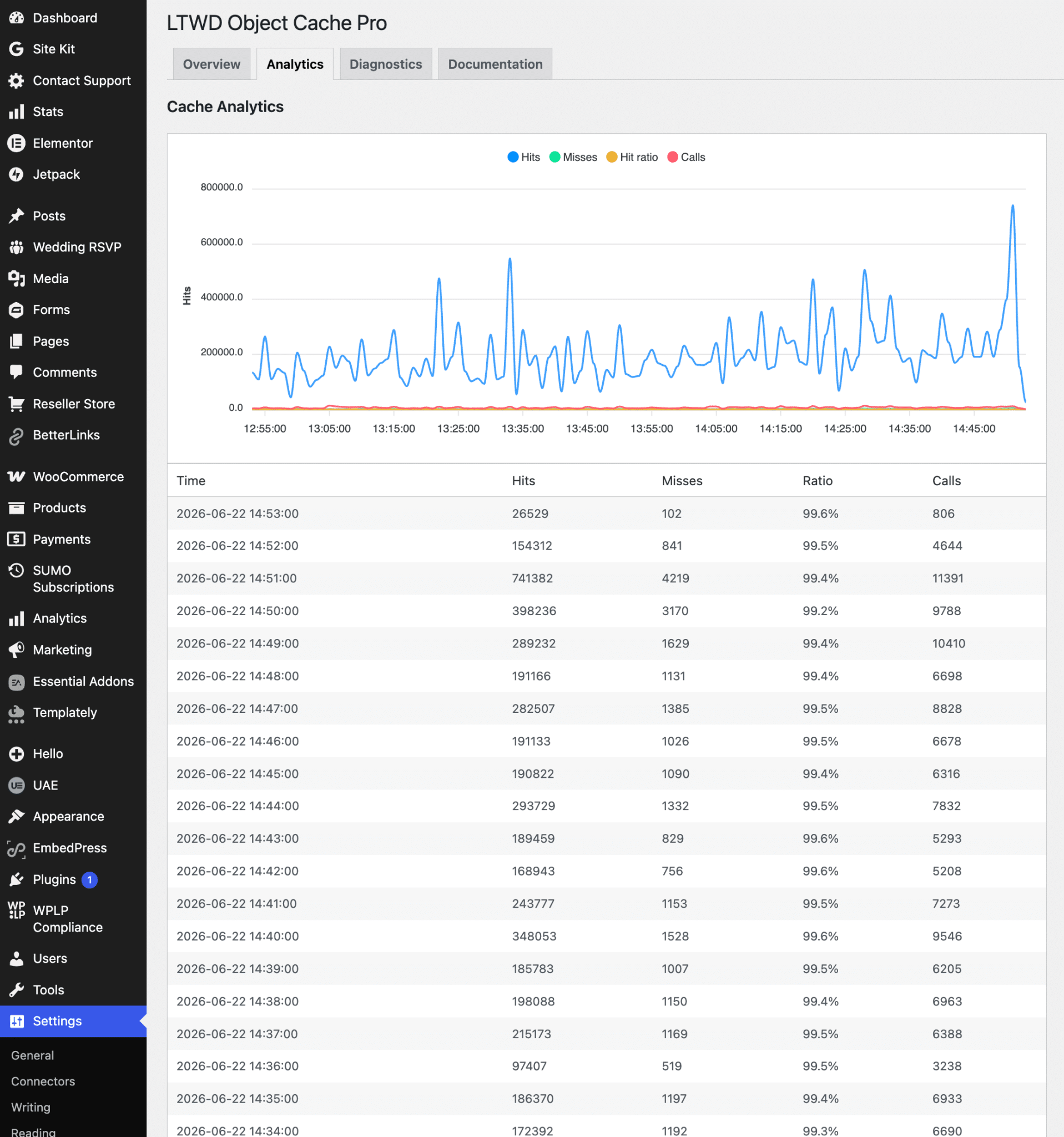
The Analytics tab records per-minute hit/miss metrics and displays interactive charts (powered by bundled ApexCharts) plus a detailed data table. Track cache effectiveness over time without leaving WordPress.
Diagnostics Tab
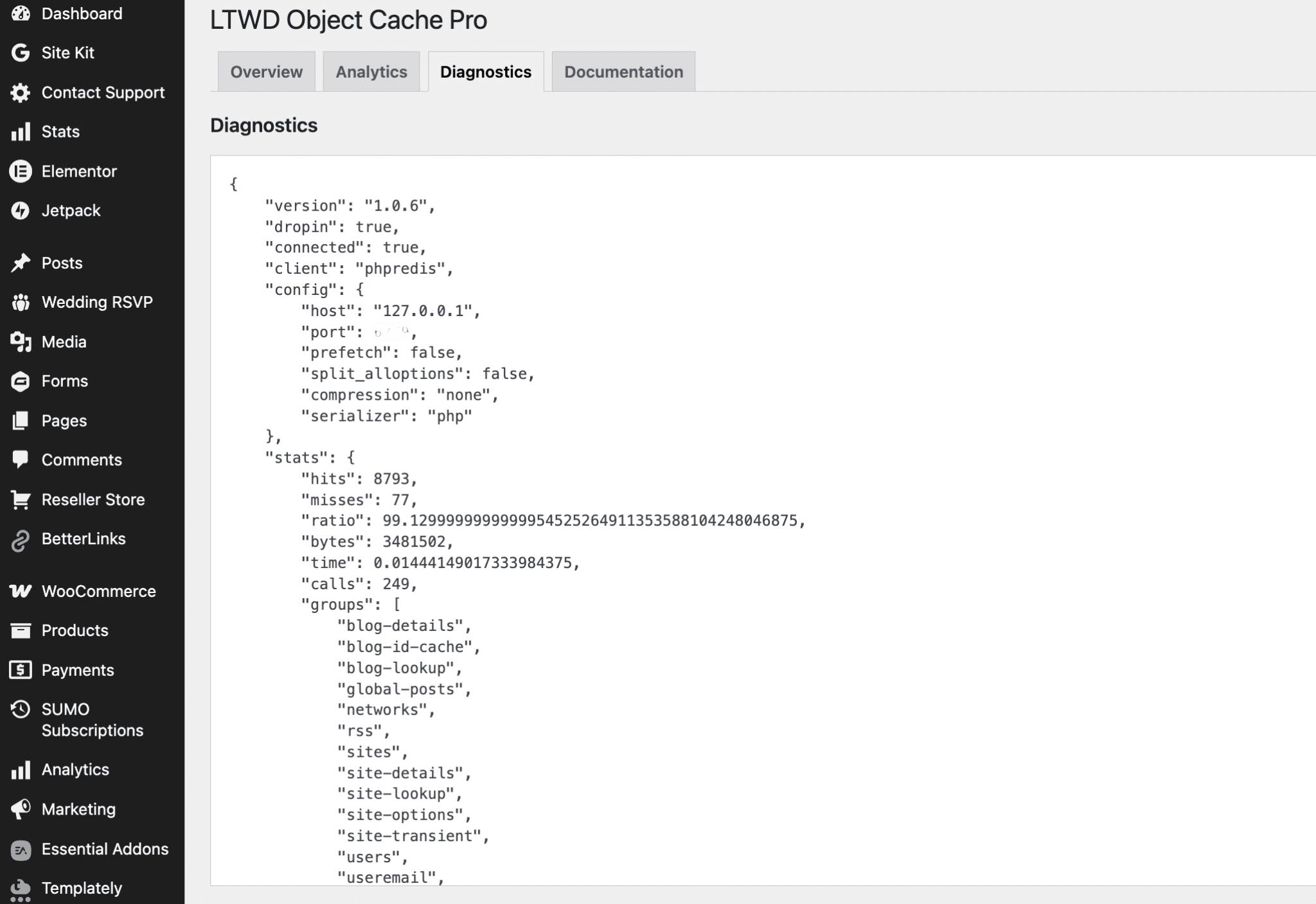
Full JSON diagnostics export including connection status, client type, hit ratio, call counts, configuration fingerprint, and runtime statistics—ideal for support and troubleshooting.
WordPress Site Health
Built-in Site Health tests verify:
- Drop-in installation and version match
- Redis connectivity
- Serializer and compression extension availability
- Configuration fingerprint changes (warns when
wp-config.php settings change after activation)
APM & Developer Integrations
- Query Monitor — Cache hit ratio, call counts, and Redis command details in the Query Monitor panel
- New Relic — Optional tracer integration for APM visibility
- OpenTelemetry — Optional distributed tracing support
- REST API — Authenticated endpoints for diagnostics, flush, and analytics (admin-only, rate-limited)
WP-CLI Commands
Full command-line control for DevOps workflows and deployment scripts:
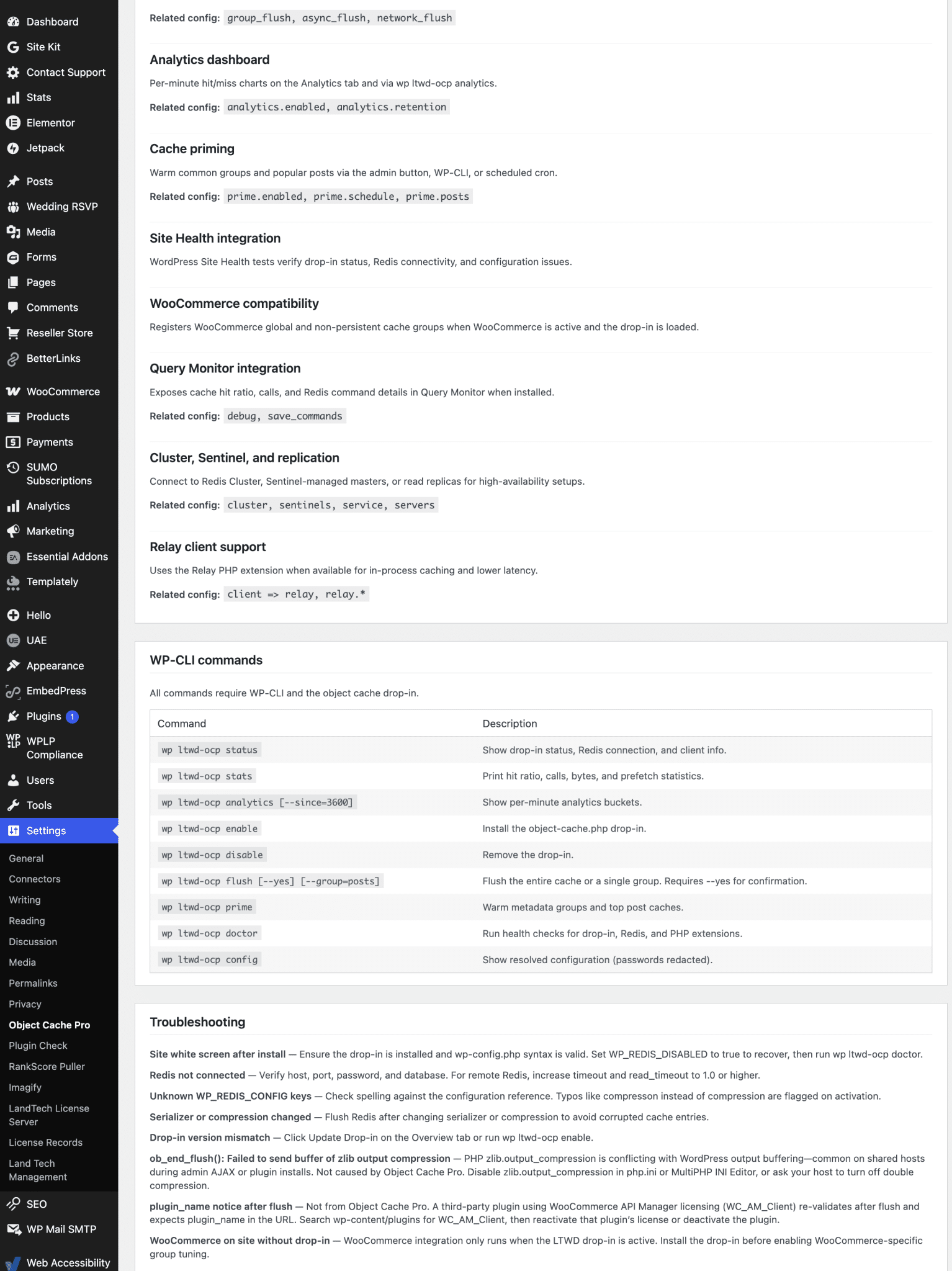
wp ltwd-ocp status — Drop-in status, Redis connection, and client infowp ltwd-ocp stats — Hit ratio, calls, bytes, and prefetch statisticswp ltwd-ocp analytics [--since=3600] — Per-minute analytics bucketswp ltwd-ocp enable — Install the object-cache.php drop-inwp ltwd-ocp disable — Remove the drop-inwp ltwd-ocp flush [--yes] [--group=posts] — Flush entire cache or a single groupwp ltwd-ocp prime — Warm metadata groups and top post cacheswp ltwd-ocp doctor — Run health checks for drop-in, Redis, and PHP extensionswp ltwd-ocp config — Show resolved configuration (credentials redacted)
Plugin & Host Integrations
- WooCommerce — Automatically registers product, order, shipping, and session cache groups for correct store behavior
- LiteSpeed Cache — Optional combined purge keeps LiteSpeed page cache and Redis object cache in sync; automatically disables LiteSpeed’s competing object-cache drop-in while LTWD Redis is active
- Batcache — Compatibility helpers for WordPress.com-style Batcache environments
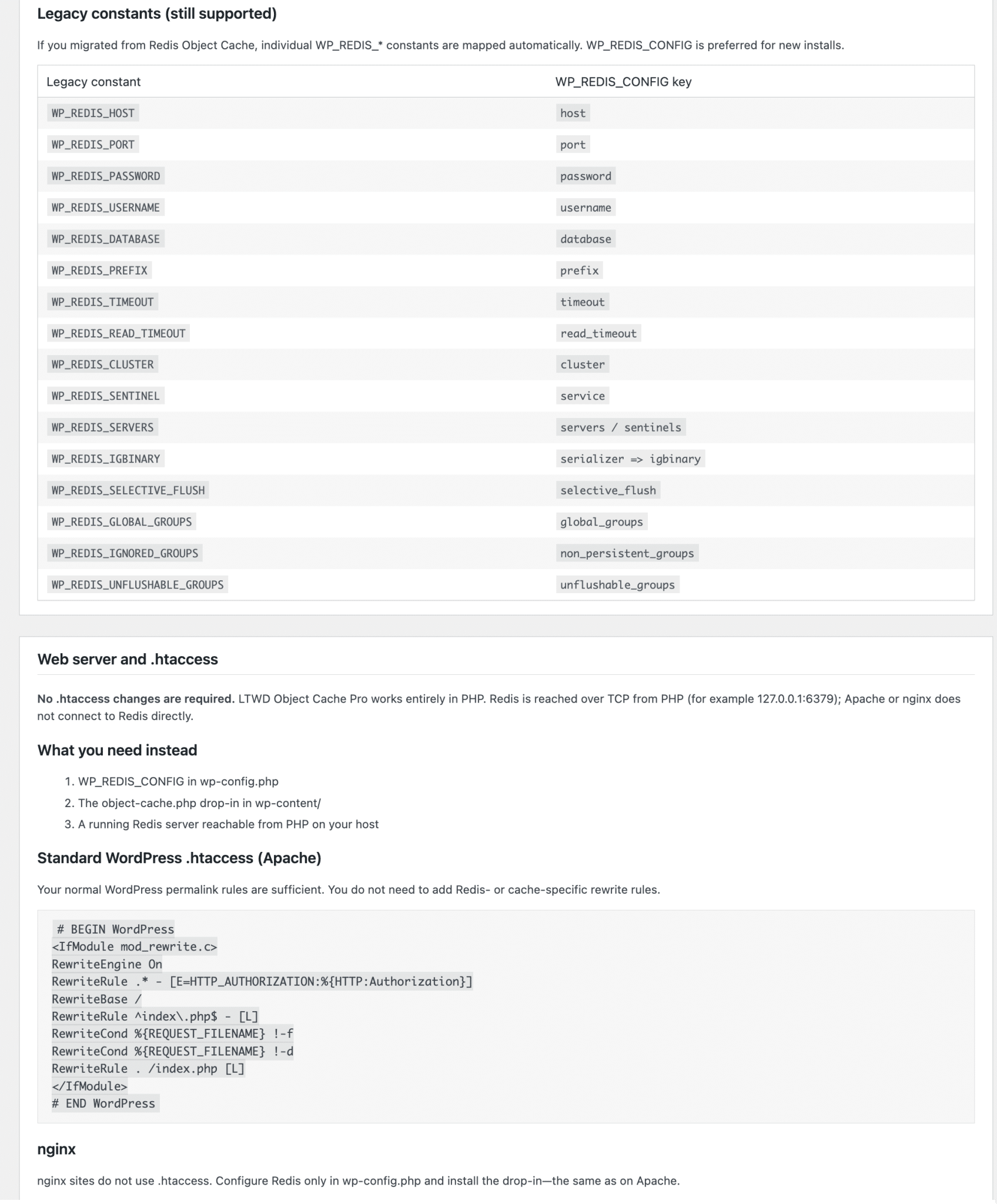
- Free Redis Object Cache migration — Maps all legacy constants, flushes Redis, and deactivates the free plugin on switch (can be disabled via constant)
Admin Dashboard
Manage everything from Settings → Object Cache Pro:
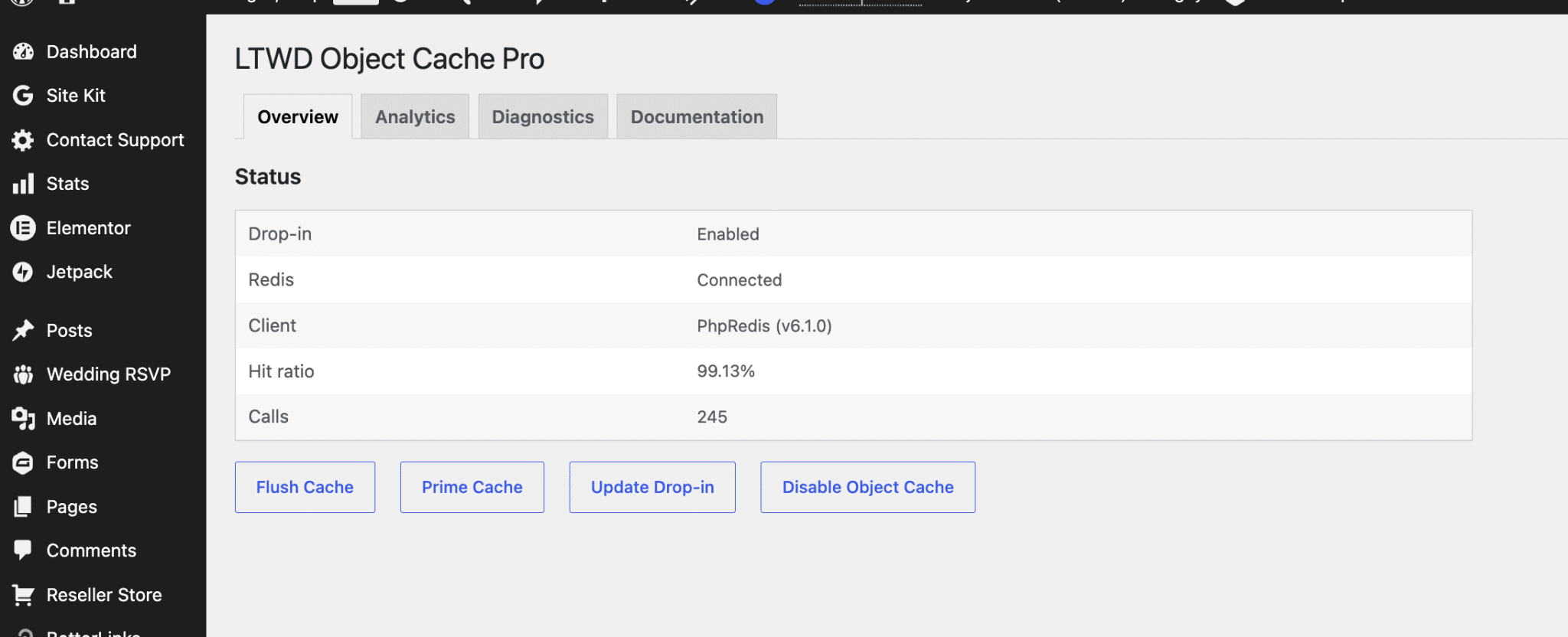
- Overview — Connection status, hit ratio, enable/disable drop-in, flush, prime, and update drop-in actions
- Analytics — Hit/miss charts and per-minute metrics table
- Diagnostics — Full runtime diagnostics JSON
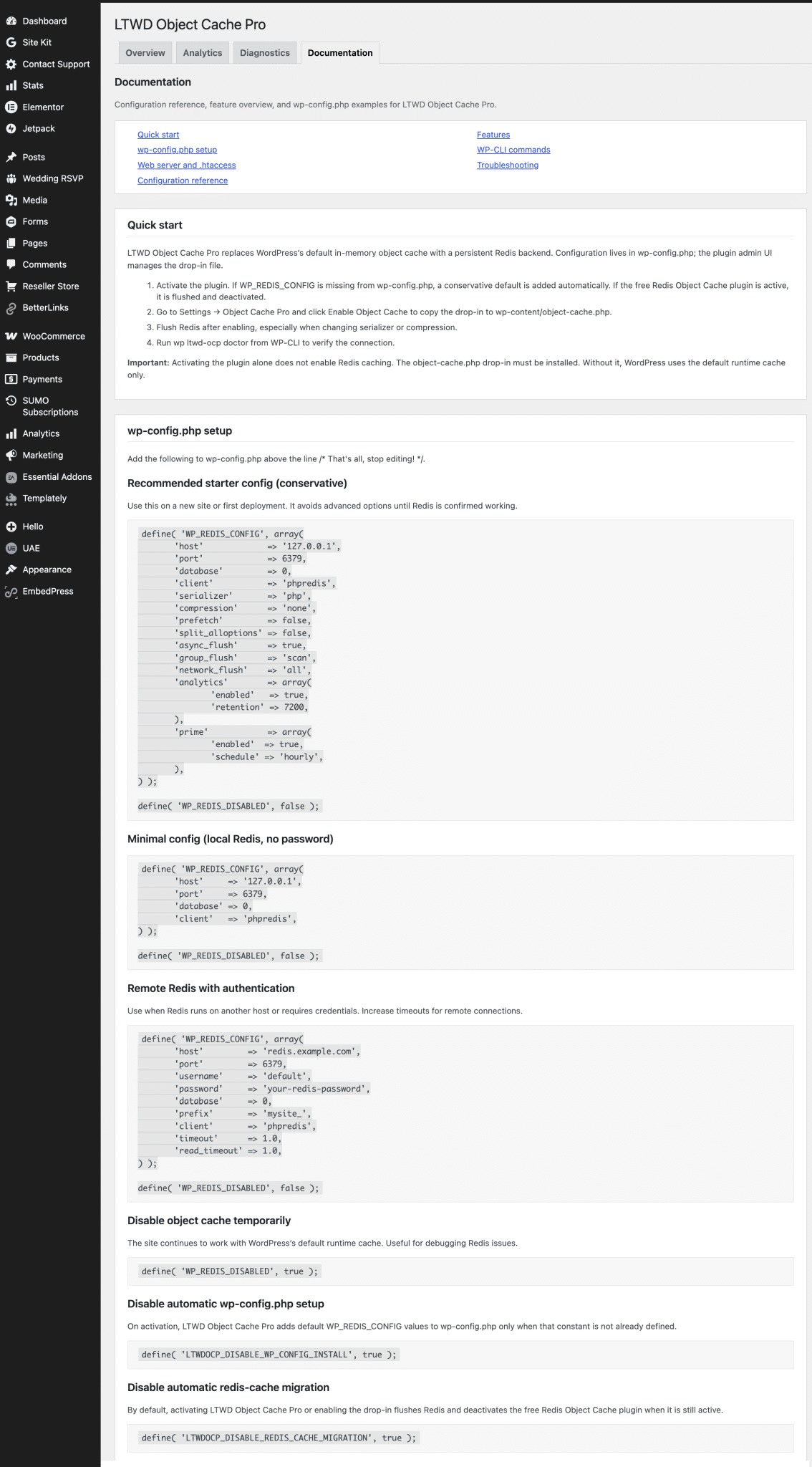
- Documentation — In-plugin guides for wp-config setup, configuration reference, server requirements, features, WP-CLI, and troubleshooting
- License — Activate, deactivate, and validate your license key
Licensing & Updates
LTWD Object Cache Pro includes integrated licensing through the Land Tech Web Designs store:
- Activate your license key directly in the WordPress admin
- Automatic plugin updates delivered to licensed sites
- Daily license validation with clear admin notices
- License tiers available for single sites, annual subscriptions, agencies, and enterprise deployments
A valid license is required to enable the Redis drop-in and use cache management features.
Configuration Highlights
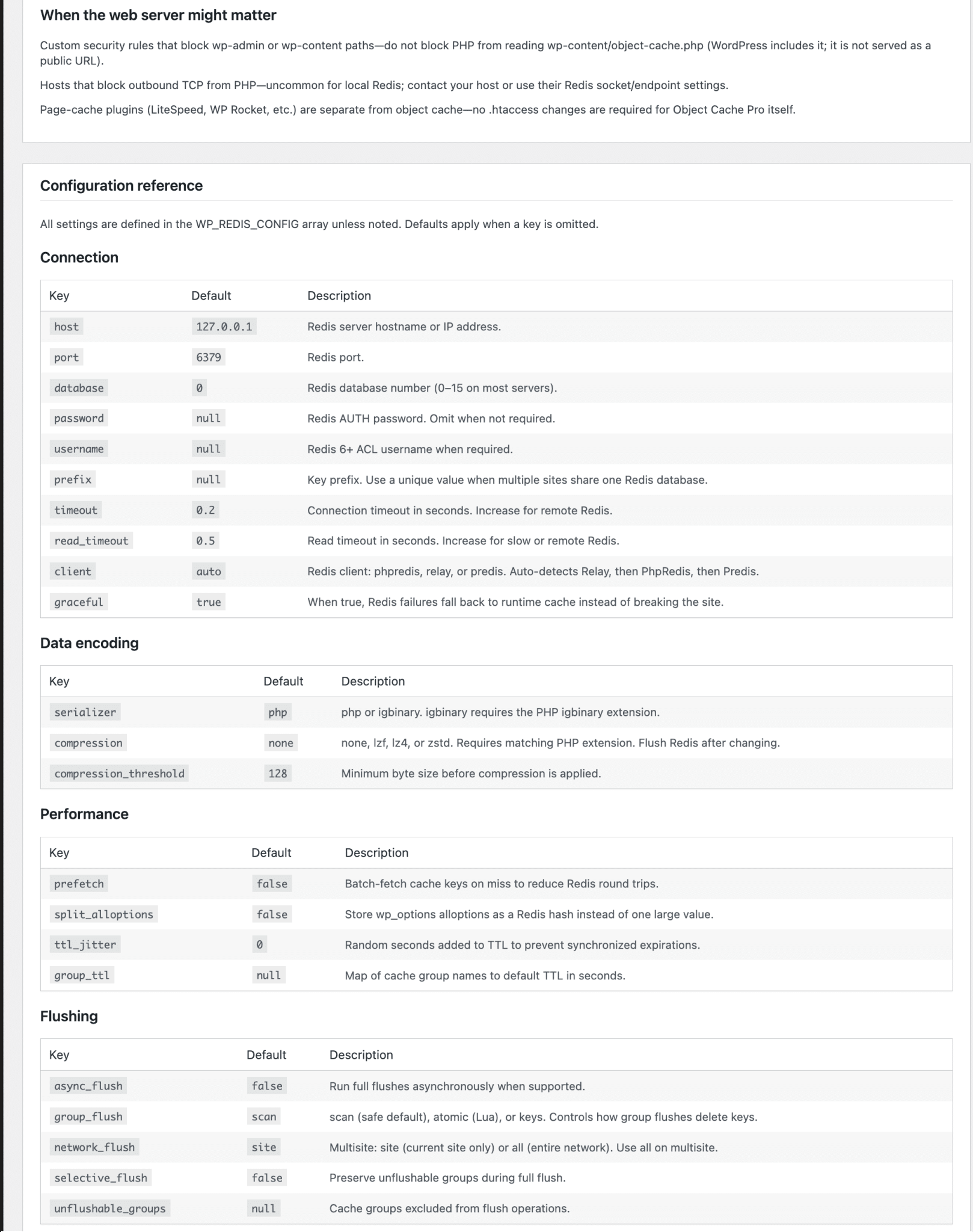
All settings are defined in wp-config.php via the WP_REDIS_CONFIG array (or legacy WP_REDIS_* constants). Key options include:
-
- Host, port, database, password, and ACL username
- Unique key prefix (auto-derived from database name when omitted)
- Connection and read timeouts
- Client selection (auto, phpredis, relay, predis)
- Graceful degradation on Redis failure
- Serializer (PHP or igbinary) and compression (none, lzf, lz4, zstd)
- Prefetch, split alloptions, TTL jitter, and group TTL maps
- Global groups, non-persistent groups, and unflushable groups
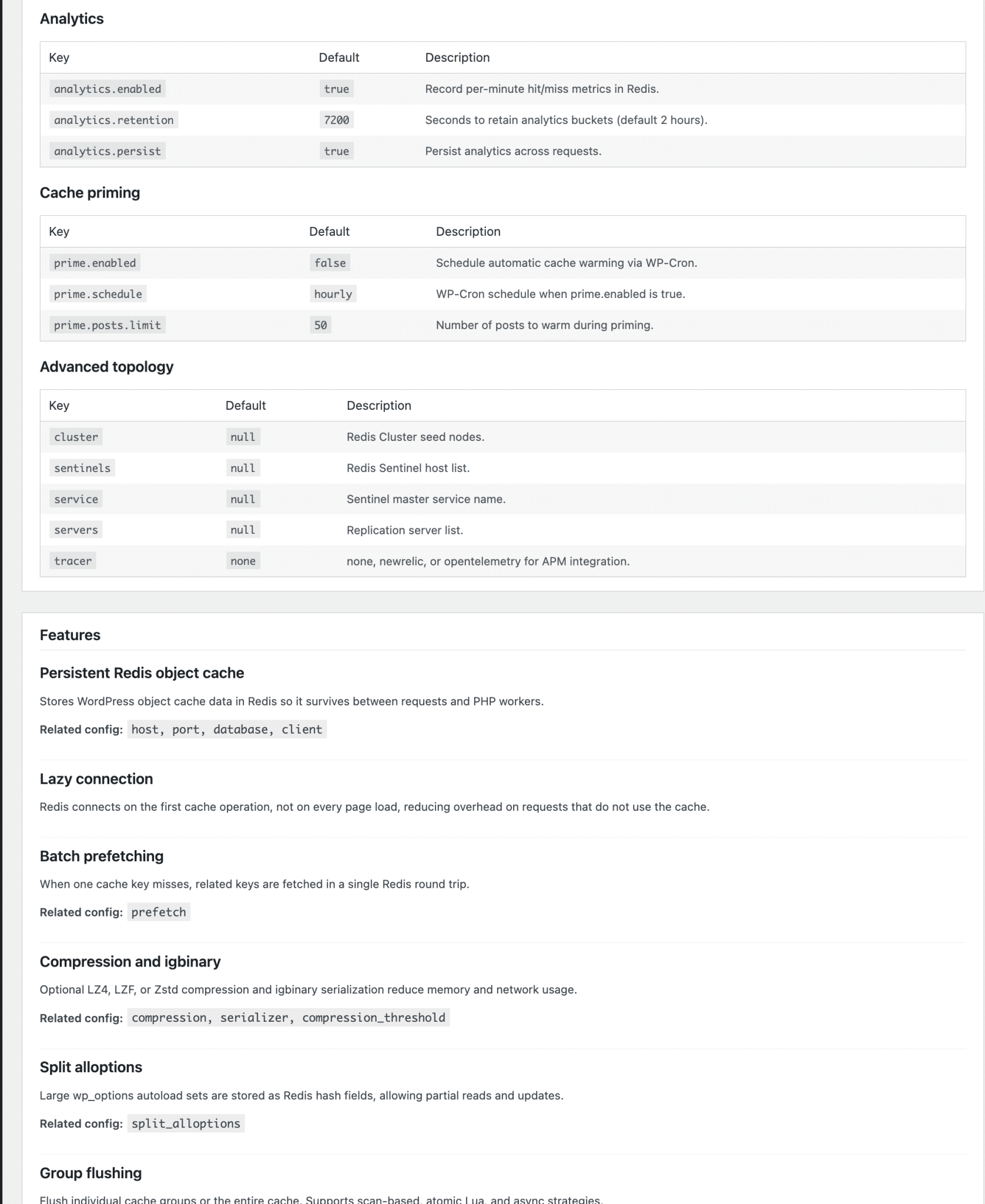
- Analytics retention and persistence settings
- Cluster, Sentinel, replication, and tracer configuration
Extensive developer hooks and filters are available for priming, configuration, and integration customization.
Requirements
- WordPress 5.0 or later (tested through WordPress 6.8)
- PHP 7.2 or later
- A running Redis server reachable from your WordPress host
- PhpRedis or Relay PHP extension recommended (Predis supported as fallback)
- Writable
wp-content/ directory for drop-in installation
No .htaccess or web server changes are required. Redis is reached over TCP from PHP—works on Apache, nginx, LiteSpeed, and local development environments.
What’s Included
- LTWD Object Cache Pro plugin (downloadable ZIP)
- Complete object-cache.php drop-in stub
- Built-in admin dashboard, analytics, and documentation
- WP-CLI command suite
- Automatic updates for the license period
- GPL-licensed plugin code
Get Started in Minutes
- Purchase and download the plugin ZIP
- Upload to
/wp-content/plugins/LTWDObjectCachePro/ and activate
- Enter your license key under Settings → Object Cache Pro → License
- Click Enable Object Cache on the Overview tab
- Flush Redis and verify with
wp ltwd-ocp doctor
Stop leaving performance on the table. LTWD Object Cache Pro gives you enterprise Redis caching with the tools, visibility, and integrations you need to run WordPress at scale.
Related: Managed DV SSL Service · Managed SAN SSL Service
Why choose LTWD Object Cache Pro?
LTWD Object Cache Pro is built for WordPress sites that need reliable features without complicated setup. Land Tech Web Designs sells and supports LTWD Object Cache Pro so you can install, configure, and grow with confidence. Our team helps with licensing questions, updates, and how this product fits your existing WooCommerce or WordPress stack.
Whether you run a small business site or a multi-site client roster, LTWD Object Cache Pro gives you a clear upgrade path and documentation-friendly workflows. Pair it with solid hosting, SSL, and professional email from our storefront for a complete toolkit.
LTWD Object Cache Pro features that matter
With LTWD Object Cache Pro, you get productized WordPress capability that is easier to maintain than custom one-off code. Customers choose LTWD Object Cache Pro when they want focused functionality, predictable pricing, and a vendor that answers support tickets. We keep product pages current so you always know what is included before checkout.
- Straightforward checkout through the Land Tech store
- Guidance on install and recommended hosting
- Help matching LTWD Object Cache Pro with related Land Tech plugins and themes
Who LTWD Object Cache Pro is for
Agencies, freelancers, and site owners use LTWD Object Cache Pro to ship features faster. If you need a WordPress solution that stays maintainable, LTWD Object Cache Pro is a practical choice. Explore more options on our Our Store page, browse all products, or contact Land Tech for recommendations.
Learn more about modern web platforms on GoDaddy, then come back to Land Tech when you are ready to purchase LTWD Object Cache Pro with local support.