AdFusion: What’s New Across the Free Plugin and AdFusion Premium—and How to Put It to Work

If you manage display advertising on WordPress, you know the constant tension: publishers need predictable tools (placements, scheduling, reporting), while readers expect fast pages and sensible ad load. AdFusion (the free plugin on WordPress.org) is the foundation—a dedicated ad manager with groups, rotation, and shortcodes. AdFusion Premium is the professional layer: placements that don’t require theme surgery, smarter delivery on cached pages, analytics, subscriptions, and advertiser workflows.

Below is a practical tour of what the stack can do today and how to use each major feature in a real news or magazine site.

The free core: your ad “content model”

Everything starts in the free AdFusion – Ad Manager, Monetization & AdSense Tracking plugin. Ads are a custom post type (adfusion_ad), which means you get revisions, permissions, and familiar WordPress workflows. You organize units with Ad Groups (a taxonomy), then place them with a simple shortcode or pull them via REST for headless or app integrations.

How to create your first campaigns

  1. Create groups first (Ads → Ad Groups). Name them by placement intent, not vendor—e.g. story-header, after-content, sidebar-rail.
  2. Create ads and assign groups. Pick an Ad Type:
    • Image ads — typically the featured image (or explicit desktop/mobile image URLs). Set a destination URL for click-through. These are ideal for sponsorships where you host the creative.
    • Custom Code / HTML / AdSense — paste network snippets when you trust the markup (and your role allows safe storage).
    • Plain Text — quick house promos or partner blurbs with an optional URL.
  3. Use Scheduling on each ad—start/end date and optional time—for flighting without unpublished posts.
  4. Drop ads into content with [adfusion id="123"] for a fixed unit, or [adfusion group="your-slug"] to rotate a random eligible ad from that group on each render.
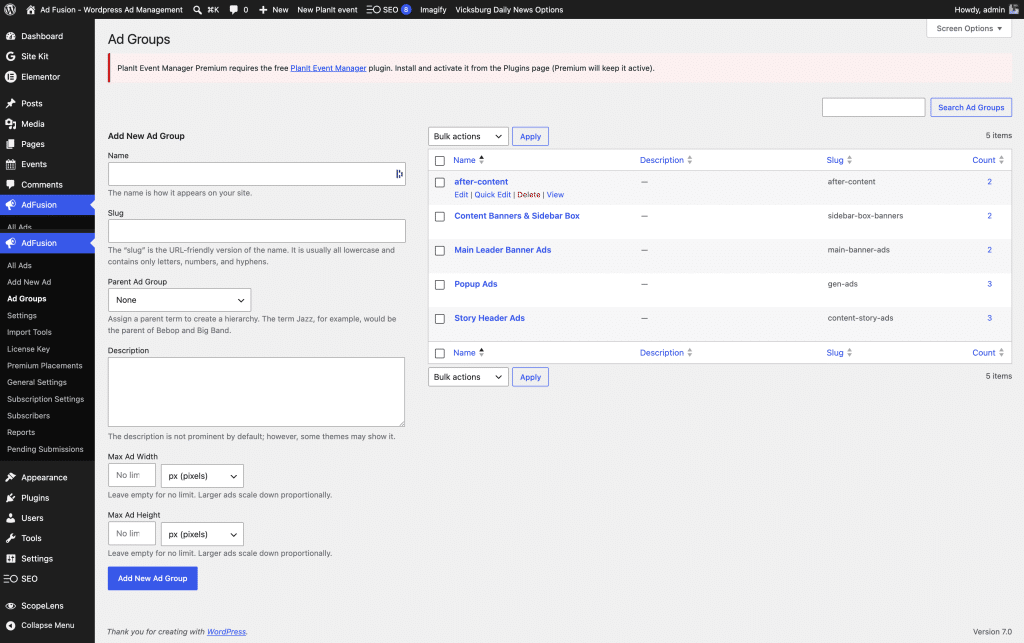
WordPress Ad Fusion Ad Groups dashboard screen

Ad Settings

Under Ads → Settings (free submenu), you can wire automatic before/after post groups for classic blog layouts, tune popup visible duration (used when Premium popups run), ads.txt for AdSense verification, story header position (above or below title for Premium placements), and other site-wide knobs.

Rest API

REST API: Integrations can list ads/groups programmatically—the readme documents that this is intentionally “Premium-ready,” meaning hooks and endpoints are structured so Paid features don’t fork your data model.

Fresh polish in recent free releases (why upgrades matter)

WordPress 7.0 readiness isn’t hype—AdFusion’s  is is 7.0 ready and it’s  Modern admin UI, PHP 7.4 minimum (with a nudge toward 8.3+), Plugin Check workflows, and the evolving editor iframe story.

Translation: fewer surprises when clients upgrade Stack.

Two delivery enhancements matter day to day:

  • Same-request deduplication (v1.2.2) — If one creative sits in multiple groups, weighted rotation avoids showing the same ID twice in one pageload. That preserves house rules like “never double the takeover” without hand-maintaining disjoint groups. Power users who want duplication can flip the adfusion_deduplicate_ads_same_request filter to false.
  • AJAX / REST rotator coherence — Slots that hydrate after load now respect already rendered IDs (exclude_ad_ids / initialExcludeAdIds), so leaderboard + sticky + group shortcodes cooperate instead of repeating the same pick.

Behind the scenes, lazy-load placeholders and data: protocol allowances help image paths survive sanitization—a small “it just loads” reliability win editors appreciate.

Premium at a glance: placements without rewriting your theme

AdFusion Premium layers on AdFusion_* placement engines. Typical pattern: choose a Premium placement group in settings (popup, leaderboard, sticky, in-story, etc.), optionally map stealth-friendly AJAX slots, then let scripts mount placeholders that fetch HTML when caches would otherwise stale your rotation.

Here is how publishers actually use each family of features:

Global leaderboard and body-open aware delivery

Premium can emit a global top-of-site leaderboard (often wp_body_open, with footer fallbacks for legacy themes without body-open support). Theme-specific holes (classic leader-strip hooks) receive attention in recent releases—you’re not stranded on obscure templates.

How to use: In Premium placements, assign a leaderboard group slug with live image or code creatives. Verify on staging with ?adfusion_debug=1 when enabled—you’ll see why a slot skipped (kill switch, no ads in group, etc.).

In-content placements and story header / footer ribbons

Premium injects placeholders for mid-article placements (typically after Nth paragraphs), a story header insertion (JavaScript-assisted for tricky theme DOMs), story footer, and configurable sticky bottom anchor.

How to use: Tune paragraph indices for readability (don’t choke the lede). For story headers, toggle above/below title in free settings and trust Premium to place wrappers that respect singular posts. Close buttons on sticky units keep UX humane.

Popups—timed overlays with AdSense safeguards

Timed popups are effective but fragile with network tags. Premium trims inline scripts that accidentally render JSON as text for AdSense-bearing bodies, yet still triggers adsbygoogle.push reliably after AJAX loads.

How to use: Assign a popup group separately from your leaderboard inventory. Respect session behavior (shown once per session in typical configurations) so return readers aren’t punished.


Anti-adblock (“stealth”) and dynamic rotation

Premium’s Stealth module rotates container classes, registers REST namespaces (adfusion/v1/fetch style proxies), feeds rotator config in the footer, and tracks deduped IDs so client-side rotation matches server truth.

How to use: Treat stealth as best-effort recovery, not a guarantee—pair with policy-safe creatives. Use debug logging options
(where enabled) to watch rotator handshakes on production-like hosts.


What this means for you… Adblockers dont work on our Plugin.


Analytics, viewability, lazy loading, and reporting

Premium tracks impressions/clicks with buffering that won’t DDoS your own server, exposes reports to admins, and includes client reporting surfaces for agencies. Viewability and lazy loading modules align with modern performance expectations—ads become candidates for measurement and deferred image work.

How to use: Align report cadence with finance (weekly vs monthly), and verify click URLs if you wrap with tracking helpers (Premium analytics classes feed campaign URLs in several paths).


Monetization beyond ads: ad-free subscriptions and self-serve sales

Stripe-powered checkout (documented in Premium’s External Services) enables ad-free subscriptions and self-serve purchases. Webhooks and email flows ship with the plugin stack; subscriber admin screens list entitlements.

How to use: Price ad-free as a clear upsell, test cancellation paths, and ensure your privacy policy mentions Stripe. The Advertiser Portal / Dashboard / Pending Submissions loop supports small sales teams—review pending creatives before they go live.

Automated renewals and user capability grants reduce manual account work for membership tie-ins.


Operations: migration, CSV, multi-site sync, kill switches

  • Migration paths help move inventory from common legacy plugins (see Premium migration class and settings UI).
  • CSV export backs up or audits creative metadata at scale.
  • Primary ↔ satellite sync keeps a main WordPress property authoritative while edge sites render remote inventory—impressions/clicks can centralize (see sync settings and security keys in General Settings).
  • Post / category kill switches remove ads from sensitive stories without editing every group map.

How to use: Document who holds the sync key, rotate it if staff depart, and test satellite reads on staging first.


Closing: who this stack is for

AdFusion Free is the right fit when you need a WordPress-native ad CMS with groups, rotation, scheduling, shortcodes, and REST—without paying for layout engineering on day one. AdFusion Premium is the right fit when where the ad appears (leaderboard, sticky, in-article, story chrome) and how it survives caching, ad blockers, and reporting obligations becomes the product.

If you’re planning a major WordPress upgrade, skim the readme’s WordPress 7.0 notes—then roll through staging with adfusion_debug and a simple checklist: leaderboard renders, sticky dedupes, popup fires once, subscription checkout returns clean URLs, and your newest marquee disclaimers read well on mobile with reduced motion honored.

External services reminder (for your site’s privacy page): free AdSense loading hits Google’s script host; Premium talks to your license endpoint and Stripe per the vendor documentation packaged in


AdFusion: What’s New Across the Free Plugin and AdFusion Premium—and How to Put It to Work

If you manage display advertising on WordPress, you know the constant tension: publishers need predictable tools (placements, scheduling, reporting), while readers expect fast pages and sensible ad load. AdFusion (the free plugin on WordPress.org) is the foundation—a dedicated ad manager with groups, rotation, and shortcodes. AdFusion Premium is the professional layer: placements that don’t require theme surgery, smarter delivery on cached pages, analytics, subscriptions, and advertiser workflows.

Below is a practical tour of what the stack can do today and how to use each major feature in a real news or magazine site.

The free core: your ad “content model”

Everything starts in the free AdFusion – Ad Manager, Monetization & AdSense Tracking plugin. Ads are a custom post type (adfusion_ad), which means you get revisions, permissions, and familiar WordPress workflows. You organize units with Ad Groups (a taxonomy), then place them with a simple shortcode or pull them via REST for headless or app integrations.

How to create your first campaigns

  1. Create groups first (Ads → Ad Groups). Name them by placement intent, not vendor—e.g. story-header, after-content, sidebar-rail.
  2. Create ads and assign groups. Pick an Ad Type:
    • Image ads — typically the featured image (or explicit desktop/mobile image URLs). Set a destination URL for click-through. These are ideal for sponsorships where you host the creative.
    • Custom Code / HTML / AdSense — paste network snippets when you trust the markup (and your role allows safe storage).
    • Plain Text — quick house promos or partner blurbs with an optional URL.
  3. Use Scheduling on each ad—start/end date and optional time—for flighting without unpublished posts.
  4. Drop ads into content with [adfusion id="123"] for a fixed unit, or [adfusion group="your-slug"] to rotate a random eligible ad from that group on each render.
WordPress Ad Fusion Ad Groups dashboard screen

Ad Settings

Under Ads → Settings (free submenu), you can wire automatic before/after post groups for classic blog layouts, tune popup visible duration (used when Premium popups run), ads.txt for AdSense verification, story header position (above or below title for Premium placements), and other site-wide knobs.

Rest API

REST API: Integrations can list ads/groups programmatically—the readme documents that this is intentionally “Premium-ready,” meaning hooks and endpoints are structured so Paid features don’t fork your data model.

Fresh polish in recent free releases (why upgrades matter)

WordPress 7.0 readiness isn’t hype—AdFusion’s  is is 7.0 ready and it’s  Modern admin UI, PHP 7.4 minimum (with a nudge toward 8.3+), Plugin Check workflows, and the evolving editor iframe story.

Translation: fewer surprises when clients upgrade Stack.

Two delivery enhancements matter day to day:

  • Same-request deduplication (v1.2.2) — If one creative sits in multiple groups, weighted rotation avoids showing the same ID twice in one pageload. That preserves house rules like “never double the takeover” without hand-maintaining disjoint groups. Power users who want duplication can flip the adfusion_deduplicate_ads_same_request filter to false.
  • AJAX / REST rotator coherence — Slots that hydrate after load now respect already rendered IDs (exclude_ad_ids / initialExcludeAdIds), so leaderboard + sticky + group shortcodes cooperate instead of repeating the same pick.

Behind the scenes, lazy-load placeholders and data: protocol allowances help image paths survive sanitization—a small “it just loads” reliability win editors appreciate.

Premium at a glance: placements without rewriting your theme

AdFusion Premium layers on AdFusion_* placement engines. Typical pattern: choose a Premium placement group in settings (popup, leaderboard, sticky, in-story, etc.), optionally map stealth-friendly AJAX slots, then let scripts mount placeholders that fetch HTML when caches would otherwise stale your rotation.

Here is how publishers actually use each family of features:

Global leaderboard and body-open aware delivery

Premium can emit a global top-of-site leaderboard (often wp_body_open, with footer fallbacks for legacy themes without body-open support). Theme-specific holes (classic leader-strip hooks) receive attention in recent releases—you’re not stranded on obscure templates.

How to use: In Premium placements, assign a leaderboard group slug with live image or code creatives. Verify on staging with ?adfusion_debug=1 when enabled—you’ll see why a slot skipped (kill switch, no ads in group, etc.).

In-content placements and story header / footer ribbons

Premium injects placeholders for mid-article placements (typically after Nth paragraphs), a story header insertion (JavaScript-assisted for tricky theme DOMs), story footer, and configurable sticky bottom anchor.

How to use: Tune paragraph indices for readability (don’t choke the lede). For story headers, toggle above/below title in free settings and trust Premium to place wrappers that respect singular posts. Close buttons on sticky units keep UX humane.

Popups—timed overlays with AdSense safeguards

Timed popups are effective but fragile with network tags. Premium trims inline scripts that accidentally render JSON as text for AdSense-bearing bodies, yet still triggers adsbygoogle.push reliably after AJAX loads.

How to use: Assign a popup group separately from your leaderboard inventory. Respect session behavior (shown once per session in typical configurations) so return readers aren’t punished.


Anti-adblock (“stealth”) and dynamic rotation

Premium’s Stealth module rotates container classes, registers REST namespaces (adfusion/v1/fetch style proxies), feeds rotator config in the footer, and tracks deduped IDs so client-side rotation matches server truth.

How to use: Treat stealth as best-effort recovery, not a guarantee—pair with policy-safe creatives. Use debug logging options
(where enabled) to watch rotator handshakes on production-like hosts.


What this means for you… Adblockers dont work on our Plugin.


Analytics, viewability, lazy loading, and reporting

Premium tracks impressions/clicks with buffering that won’t DDoS your own server, exposes reports to admins, and includes client reporting surfaces for agencies. Viewability and lazy loading modules align with modern performance expectations—ads become candidates for measurement and deferred image work.

How to use: Align report cadence with finance (weekly vs monthly), and verify click URLs if you wrap with tracking helpers (Premium analytics classes feed campaign URLs in several paths).


Monetization beyond ads: ad-free subscriptions and self-serve sales

Stripe-powered checkout (documented in Premium’s External Services) enables ad-free subscriptions and self-serve purchases. Webhooks and email flows ship with the plugin stack; subscriber admin screens list entitlements.

How to use: Price ad-free as a clear upsell, test cancellation paths, and ensure your privacy policy mentions Stripe. The Advertiser Portal / Dashboard / Pending Submissions loop supports small sales teams—review pending creatives before they go live.

Automated renewals and user capability grants reduce manual account work for membership tie-ins.


Operations: migration, CSV, multi-site sync, kill switches

  • Migration paths help move inventory from common legacy plugins (see Premium migration class and settings UI).
  • CSV export backs up or audits creative metadata at scale.
  • Primary ↔ satellite sync keeps a main WordPress property authoritative while edge sites render remote inventory—impressions/clicks can centralize (see sync settings and security keys in General Settings).
  • Post / category kill switches remove ads from sensitive stories without editing every group map.

How to use: Document who holds the sync key, rotate it if staff depart, and test satellite reads on staging first.


Closing: who this stack is for

AdFusion Free is the right fit when you need a WordPress-native ad CMS with groups, rotation, scheduling, shortcodes, and REST—without paying for layout engineering on day one. AdFusion Premium is the right fit when where the ad appears (leaderboard, sticky, in-article, story chrome) and how it survives caching, ad blockers, and reporting obligations becomes the product.

If you’re planning a major WordPress upgrade, skim the readme’s WordPress 7.0 notes—then roll through staging with adfusion_debug and a simple checklist: leaderboard renders, sticky dedupes, popup fires once, subscription checkout returns clean URLs, and your newest marquee disclaimers read well on mobile with reduced motion honored.

External services reminder (for your site’s privacy page): free AdSense loading hits Google’s script host; Premium talks to your license endpoint and Stripe per the vendor documentation packaged in